

You're ordering tags for a pump, a switchboard or a new batch of medical equipment, and the spreadsheet already has more fields than the label can hold. Someone wants the room number engraved. Someone else wants the next inspection date. Meanwhile, you need a code that still identifies the equipment after it moves, changes departments or comes back from repair.
A good asset tagging format separates those jobs. The tag identifies the physical item, the number connects it to a record, and the asset register holds the details people need to update. Getting those layers right matters more than squeezing extra information onto the plate.
Asset Tagging Formats Compared at a Glance
For most industrial assets, a laser-marked metal plate carrying a unique number and a barcode or Data Matrix code is a durable default. Add RFID when bulk reading solves an operational problem, or a QR code when staff need convenient phone access to information.
Choose the code and the material separately. A barcode describes how information is encoded, not whether the label will survive cleaning, sunlight or abrasion.
Asset tagging formats compared
| Format | What it carries | How it is read | Best fit | Durability |
|---|---|---|---|---|
| Linear barcode, such as Code 128 or Type 39 | Short alphanumeric ID | Laser or camera scanner at close range | Equipment with a printed number beneath | Good on metal; paper labels can fade or deteriorate in heat |
| GS1 Data Matrix | Structured information in a compact square, with multiple fields possible | Compatible camera scanner, including angled reads within its capability | Compact items and multi-field records | Strong when laser-marked; requires quality checks |
| QR code | Text or a web link, with room for more information than a short ID | Phone or camera scanner | Public-facing information and service tasks | Material determines survival; register compatibility needs checking |
| RFID tag, including EPC or HF applications | Electronic identifier without direct line of sight | Compatible radio reader, including bulk reading | Vehicles, tools and high-volume stock | Select a suitable housing; metal and liquids can affect performance |
| Engraved plate with text only | Human-readable number and owner | Visual reading and manual entry | Fixed plant without scanner dependency | Excellent when appropriately laser-engraved on stainless steel |
Read the table as separate decisions
Capacity means how much information the format can carry, not how much you should put into it. The reading method determines whether your team needs a handheld scanner, phone camera or radio reader.
For the optical choice, the Data Matrix versus QR code comparison helps distinguish compact industrial identification from phone-led access. Check what your asset-management software accepts before choosing either symbol.
A successful scan isn't proof that the database association is correct. Doczen's explanation of why correct barcodes still misroute cases is a useful prompt to check the relationship between the encoded value and the record it retrieves.
Practical rule: One identifier can appear through several carriers, but every tag should also have a readable line so staff can identify the asset without a working scanner.
What a Tag Should Carry and What Stays in the Register
The physical tag should hold stable identity. The asset register should hold changing facts. Trying to make a permanent plate serve as a maintenance log creates unnecessary replacement work.
NSW Health Infrastructure's building asset nomenclature guidance distinguishes an owner-controlled asset tag from contractor-applied equipment references and the manufacturer's original information. Its equipment-reference examples include “Chiller 1”, “AHU 01” and “TMV12”, while manufacturer information includes model, serial number, manufacture date and capacity.
Those labels answer different questions. An owner's identifier answers “Which physical item is this?” A schematic reference answers “What role does it perform in this system?” The manufacturer plate answers “What did the manufacturer supply?”
Give each field a clear home
Tag fields and register fields
| Field | On the physical tag | In the asset register |
|---|---|---|
| Unique asset identifier | Yes, as barcode and printed number | Yes, linked to the full record |
| Asset class or colour prefix | Optional, if your organisation uses one | Yes |
| Manufacturer model and serial | Only where the original plate is unreadable | Yes, as the full record |
| Location, room or site | No, it changes when assets move | Yes, updated on each move |
| Custodian or responsible department | No | Yes |
| Maintenance or inspection status | No | Yes, updated after each service |
| Hazard or safety code | Yes, where the item needs it | Yes |
| Service contact | Optional, as a short phone number or web address | Yes |
Keep the manufacturer plate intact and accessible. If it remains readable, there's usually no reason to reproduce its contents on the owner's tag. Record those details in the register so technicians can search them without crowding the identification plate.
Say a pump carries the hypothetical identifier PUMP-A on a metal plate. Its record lists Plant Room 2, the responsible maintenance team and the last service date. When someone relocates the pump, they update its record rather than commissioning another identity plate.
Keep operational labels separate
A service contact is useful only if the organisation can maintain it over the tag's intended life. A central service address is generally a better choice than an individual technician's contact details.
Safety information needs separate judgement. Don't remove required warnings merely to simplify the asset tag, and don't use the identification plate as a substitute for a required inspection label.
If a field could change during the asset's life, put it in the register rather than permanently engraving it into the owner's identification plate.
Australian Standards Behind Asset Tag Formats
The first question isn't which code looks best. It's which identification rules apply to the equipment, customer or supply chain.
Australia's Digital Health Implementer Hub guidance on GIAI describes the Global Individual Asset Identifier as an identifier for individual physical assets, including computers, desks, vehicles, transport equipment and spare parts. The identity can be represented by a barcode or EPC/RFID tag and recorded across asset-management and accounting systems.
GS1 Australia's GIAI guidance describes a company prefix combined with an owner-defined alphanumeric asset reference, within the identifier's maximum of 30 characters. Don't assume that an internal equipment number becomes a compliant GS1 identifier just by placing it inside a barcode.
Match the identifier to the job
The Digital Health asset identification fact sheet distinguishes GIAI for individual assets from Global Returnable Asset Identifier, or GRAI, for returnable assets. Reusable containers, cylinders and pallets need an identification approach suited to their returnable role.
For medical-device applications, TGA UDI labelling guidance requires RFID implementations to follow open international standards such as ISO/IEC 17360:2023, with a linear or two-dimensional barcode as an alternative access method. That fallback matters when staff lack a radio reader or the surrounding installation affects radio performance.
The TGA's medical-device safety announcement identifies July 2026 as the scheduled start of mandatory UDI compliance for implanted medical devices, including barcodes on product packaging and labelling. Medical items are marked for Unique Device Identification traceability, which isn't interchangeable with an owner's maintenance identifier.
Separate identification from inspection
Defence applications also require contract-specific attention to permanent marking, structured encoding and human-readable information. The Defence supplier barcode booklet specifies human-readable interpretation beneath linear barcodes and a GS1 Data Matrix component for its inventory labels.
Electrical inspection tags serve another purpose again. DLG Electrical's Queensland tagging guide provides relevant context for teams distinguishing equipment identity from electrical testing requirements.
At Evright Industrial, our work includes identifying markers for defence and essential services items. The decision remains regulator and customer requirements first, with internal numbering used where those requirements leave room for it.
How Queensland Health Labels a Single Asset
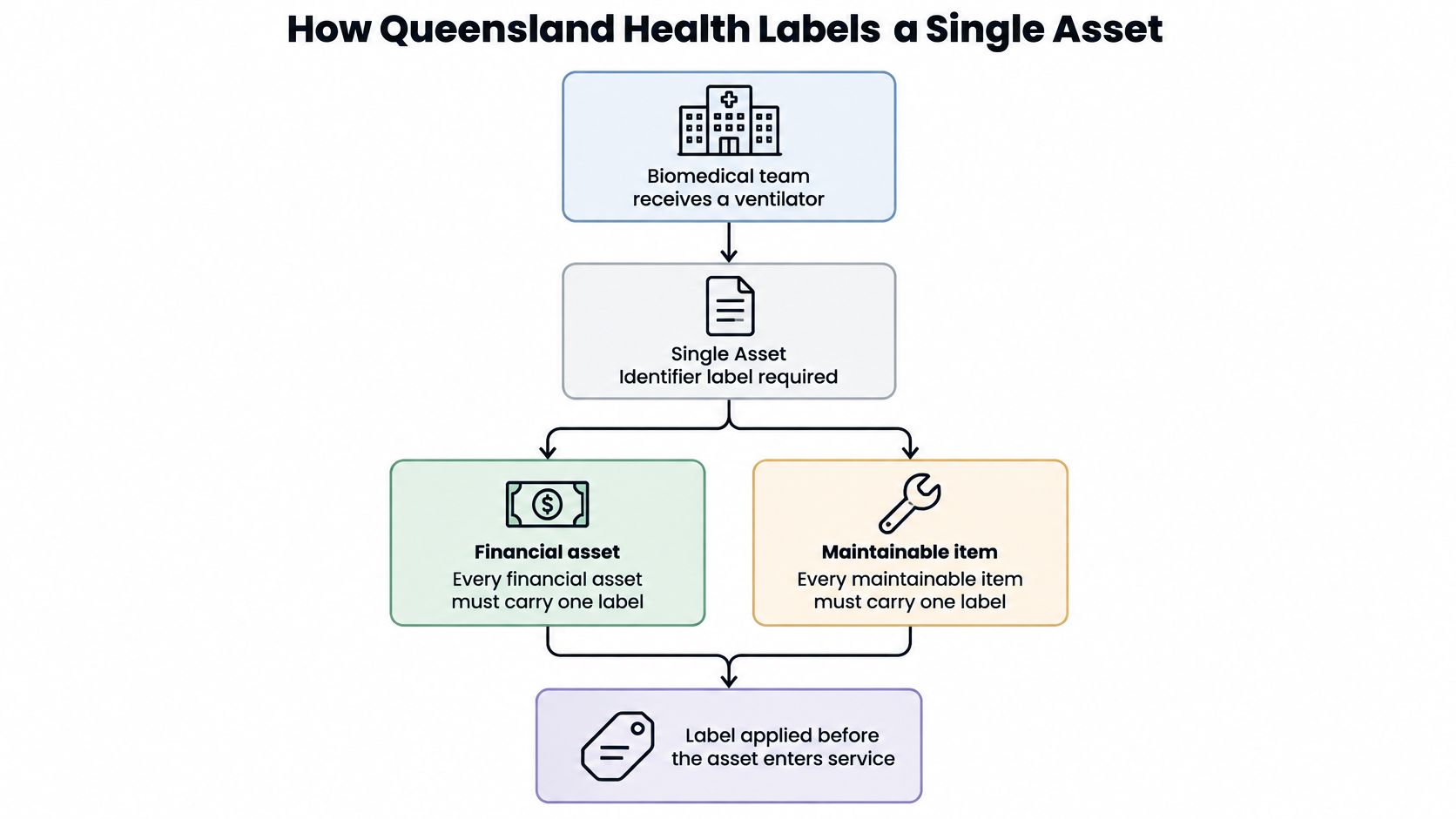
A biomedical team receives a ventilator. Before releasing it into service, the receiving workflow needs to connect that physical item with the organisation's systems, not merely attach an available sticker.
Queensland Health's Single Asset Identifier guideline requires financial assets and maintainable items to receive a Single Asset Identifier, or SAID, barcode label on receipt. It specifies an eight-digit numerical code, a Type 39 barcode font, and a label measuring 48 mm by 15 mm, with Queensland Health above the barcode.
The receiving-to-registration workflow makes the connection explicit.
Recognise the class before scanning
Under the guideline, white labels with prefix “1” identify financial assets, while yellow labels with prefix “3” identify maintainable items. The readable numerical value lets staff check the identity by eye as well as through the barcode.
For the ventilator scenario, the team first establishes the appropriate classification and allocated SAID. Staff shouldn't choose a colour because it matches another sticker nearby or generate an equipment number independently of the controlled process.
The guideline calls for a label on each individual asset, in a standardised position wherever practical, clearly visible and accessible. That makes placement part of the format rather than an afterthought.
Complete the system entry
Financial assets have their SAID recorded in the Inventory Number field. Maintainable objects have it recorded in both the Equipment and Inventory Number fields.
A practical receiving procedure follows that logic:
- Lock the class rules before printing. Confirm the approved prefix and colour rather than allowing separate teams to improvise.
- Apply the allocated label to the individual item. Don't let a transport case's identification stand in for the equipment inside.
- Use the agreed position for that equipment class. Staff need to find the label without searching behind panels or obstructing clinical use.
- Complete the matching system fields during receipt. As an internal workflow target, finish registration the same day rather than leaving a loose list for later entry.
The useful lesson isn't to copy Queensland Health's dimensions into every industrial project. It's to define numbering, appearance, placement and registration together, so receiving staff can follow a repeatable process.
How to Build a Persistent Asset Number
Build the numbering scheme before producing plates. A clean layout can't rescue a sequence that different sites allocate independently or a register that removes leading zeros.
The Australian Defence barcoding handbook defines a unique identifier as a data string encoded in a barcode and applied directly or through a securely attached plate, tag or label. It treats the mark as permanent and unchanged over the item's life, uses the Unique Item Identifier to distinguish like and unlike items, prefers GS1 Data Matrix for unique-item identification, and specifies linear barcode quality assessment under ISO/IEC 15416.
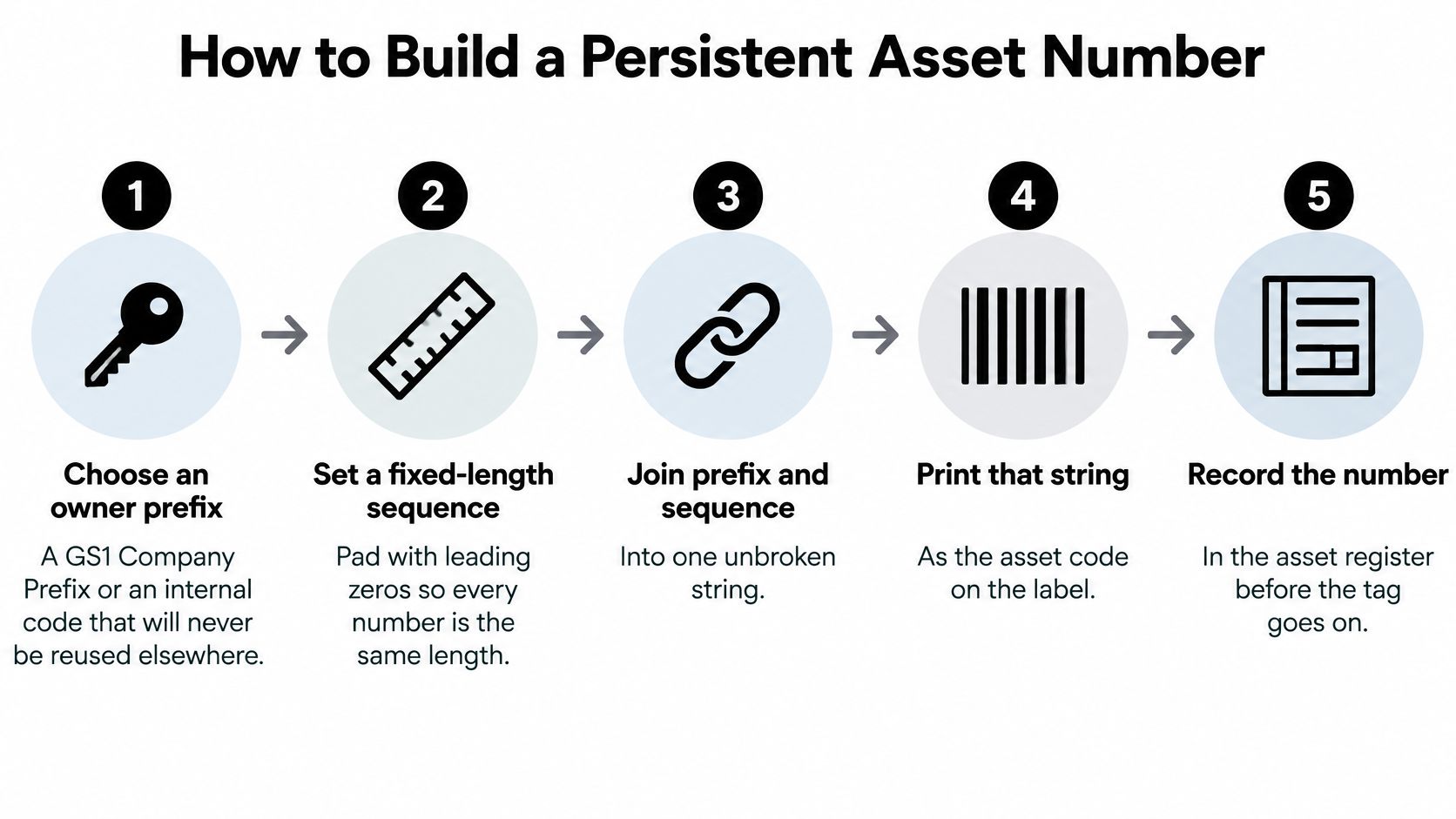
The basic relationship is prefix, allocated sequence, encoded value and registered record.
Allocate the identity deliberately
Choose an owner prefix. Use a GS1 Company Prefix where that system applies, or reserve a controlled internal prefix across your organisation, because separately managed sites mustn't issue competing identities.
Set a fixed-length sequence. For a hypothetical internal scheme, an eight-digit sequence padded with leading zeros gives plates a consistent layout, but the register must store it as text to preserve those zeros.
Add a class code only when it stays meaningful. An equipment-type code may be useful, but a room, current department or temporary operating role shouldn't determine the permanent identity.
Allocate centrally and retire numbers without reusing them. Keep the historical record when an asset leaves so a later purchase can't inherit its maintenance or accounting history.
Check for duplicates before printing. Validate the proposed list against existing and retired records, because correcting a spreadsheet is easier than replacing installed plates.
Encode and verify the result
Encode the approved identifier in a compatible carrier. Use a linear barcode or properly constructed GS1 Data Matrix where appropriate, with the corresponding readable identity beneath it, because staff need an independent way to verify the mark.
Apply the relevant quality check. Where a contract or audit calls for linear barcode verification, assess against the applicable quality specification rather than treating a successful handheld scan as certification.
For internal schemes, agree on permitted characters, separators and ownership of the allocation list. The asset identification number guide can help frame those decisions before the artwork is prepared.
A barcode image isn't automatically a compliant structured identifier. Where GS1 syntax applies, confirm that the encoded content, field interpretation and readable text meet the required application rules.
Release check: Scan the code, read the printed identity and confirm that both retrieve the same asset record.
Materials and Placement That Survive Industrial Use
Metal is the stronger starting point for permanent industrial identity. Choose the plate for the harshest credible exposure, then choose a marking process that produces readable contrast on that surface.
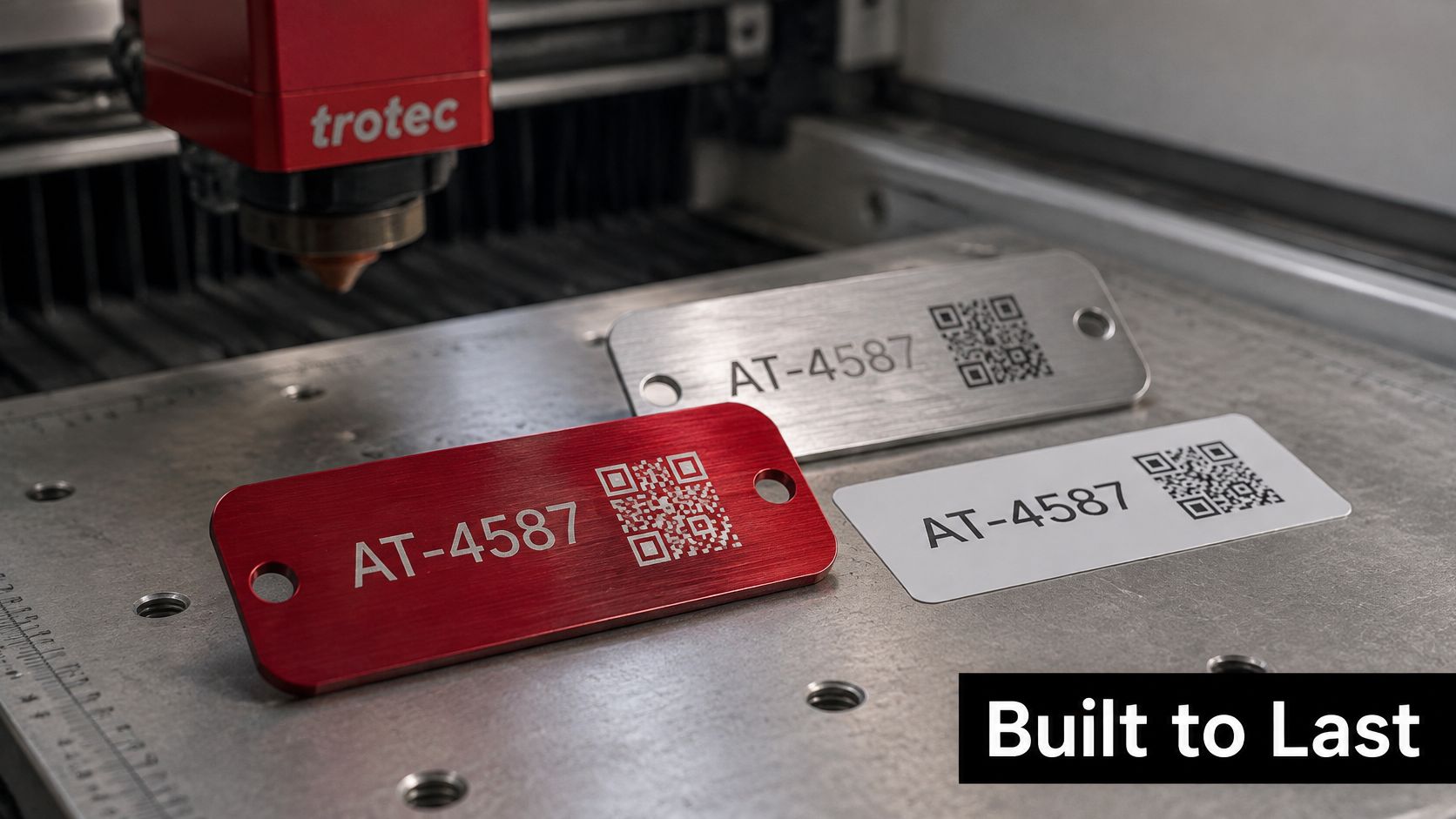
A Trotec Laser machine provides a laser-based approach rather than mechanical engraving.
Tag materials by environment
| Material | Typical environment | Marking method | Life and limits |
|---|---|---|---|
| Stainless steel | Corrosive, washdown or outdoor plant | Laser engraving or dot peen | Long-life option for permanent identity; select a suitable grade and process |
| Anodised aluminium | Workshops and electrical panels | Laser marking on the anodised layer | Durable; achievable contrast is affected by colour and finish |
| Polyester label | Indoor, low-abuse assets | Thermal transfer print | Shorter-life alternative; check adhesive and temperature ratings |
| Vinyl label | Moderate indoor and outdoor use | Thermal print | UV exposure can cause fading; suits shorter replacement cycles |
Match the marking process to the surface
With a suitable Trotec Laser machine and settings, stainless steel and anodised aluminium can receive permanent identification without relying on printed ink. The laser changes or removes material at the surface, so the number and code become part of the marked plate.
The mark and the attachment are separate choices. A laser-marked plate doesn't need adhesive to create its image, but it still needs secure fixing to the equipment. Choose mechanical fixing or an adhesive system suitable for the installation.
Our marking capability extends to almost any material, allowing the identification layout to carry across different equipment surfaces. That doesn't mean every material accepts the same laser settings or produces the same contrast.
This Trotec video shows the laser process in operation.
Place the tag for routine use
Set a standard position for each asset class, in clear view at normal working distance. Avoid seams, exposed edges, moving parts, service-panel joints and surfaces that operators regularly grip or abrade.
For cables and small parts, consider heat-shrink identification or a suitable plastic tag rather than forcing a rigid plate onto a tight curve. Preserve existing manufacturer identification, ventilation and safety markings.
The choice of asset tracking labels should include attachment and readability, not just face material. Check adhesive ratings against the actual temperature and cleaning chemicals, and prepare the surface without damaging its coating.
For washdown or outdoor equipment, start with metal and inspect the sample after a full site cleaning cycle. Check contrast, corrosion, attachment and scan performance before approving the construction.
Confirm Your Format on a Pilot Batch
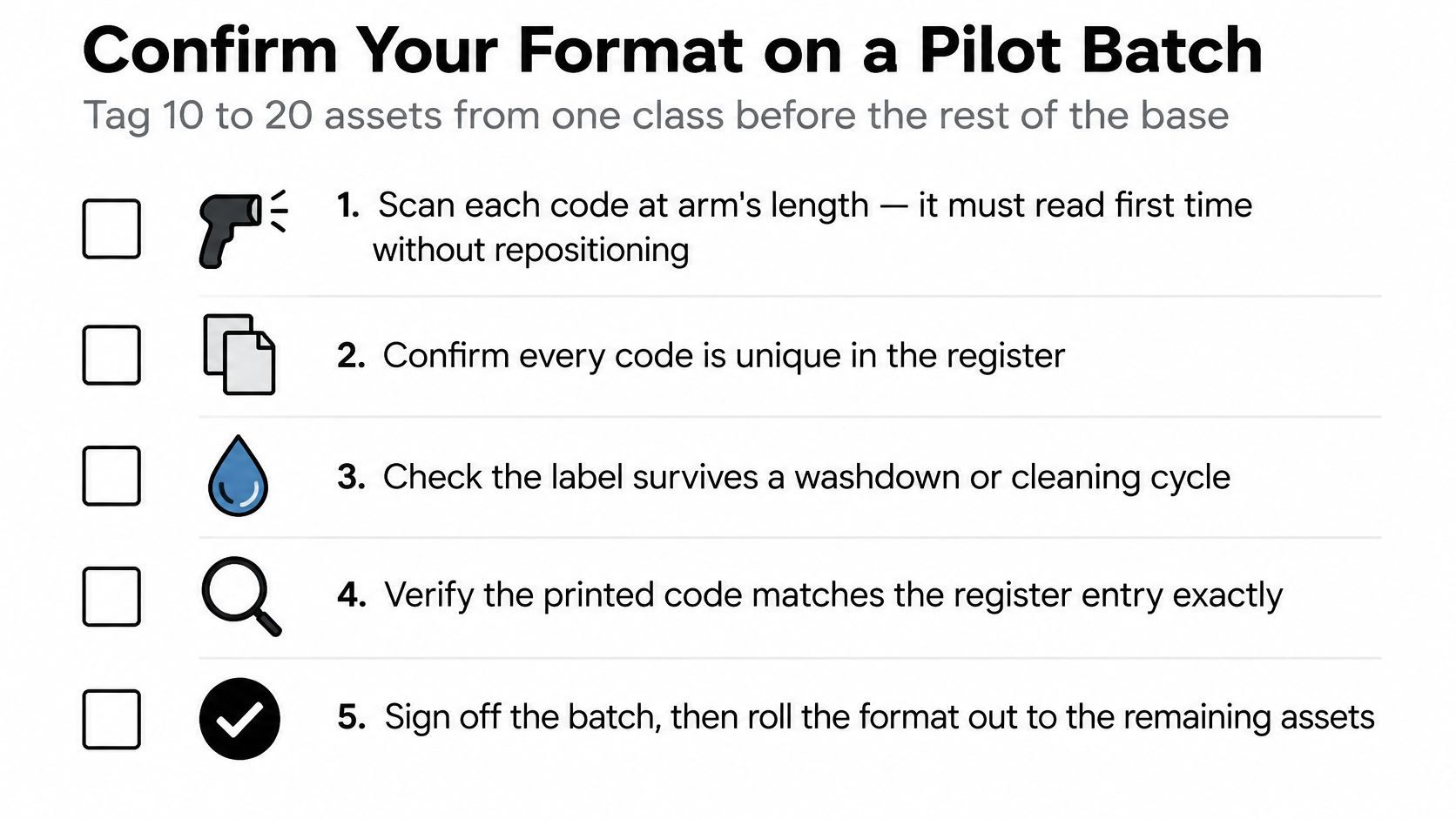
Trial the proposed format on a small, representative group before committing the remaining asset base. For example, a pilot of ten to twenty assets from the same class can expose placement, cleaning and software issues without turning the trial into a full rollout.
Use the pilot as a controlled acceptance check.
Test the complete workflow
- Scan in working conditions. Try normal working distance and an angled approach with the actual reader.
- Compare the readable identity. Confirm the displayed scan result matches the characters on the tag.
- Retrieve the record. Check that every identifier is unique and opens the correct equipment entry.
- Use the site's cleaning process. Inspect for fading, lifting edges, damaged contrast or attachment failure.
- Confirm the class rules. Check that any colour or prefix matches the approved allocation.
- Document placement. Record the accepted position in the tagging procedure before signing off the batch.
For adhesive labels, surface preparation deserves its own check. InchBug's label adhesion guide for parents offers an accessible introduction to adhesion testing, although industrial acceptance must use your actual surfaces and exposures.
If a test fails, adjust the medium, code size or placement before changing the allocated identity. Keep the failed sample and record the reason so the production batch doesn't repeat it.
Evright Industrial is the laser engraving division of evright.com, focused on asset labelling and industrial engraving across the materials discussed here. We mark customer-supplied items using the appropriate laser process, and customers request a quote from their project manager.
Evright Industrial offers laser engraving for durable asset identification, including marking customer-supplied plates with a Trotec laser so the asset number remains on the metal. Visit Evright Industrial to discuss your tag material, identifier layout and pilot samples, then request a quote from your project manager.
Recent Comments