
A line goes down. Maintenance gets called. The technician knows the machine has been troublesome before, but the service notes are in a spreadsheet someone copied last year, the last parts change was logged in a paper folder, and the asset ID plate is so worn it can't be read without a torch and a guess. Then a safety audit lands in the same week, and suddenly the problem isn't just one machine. It's the whole system around it.
That's where many industrial sites still operate. The software exists. The intent is there. But the chain between the record in the system and the asset on the floor is weak.
Industrial asset management software only becomes useful when the digital record and the physical asset can be tied together every time, by every team, in real operating conditions.
From Industrial Chaos to Controlled Operations
Most operations teams don't start looking for industrial asset management software because they love software. They start because they're tired of losing time to preventable confusion.
A common pattern looks like this. Finance has one asset register. Maintenance has another. Production supervisors keep local notes because they don't trust either one. Contractors arrive on site and can't tell which pump, cabinet, or motor is the current live asset because the label is faded, painted over, or missing. When something fails, the team spends too much time proving what the asset is before they can fix it.
That mess creates more than frustration. It slows fault finding, weakens maintenance planning, and makes audits harder than they should be. You can have capable tradespeople and still run a disorganised operation if the asset information is scattered or unreliable.
Industrial asset management software is meant to stop that. It gives operations a central system for asset records, service history, work orders, status, ownership, compliance documents, and lifecycle decisions. Instead of asking three departments for three versions of the truth, the team works from one controlled record.
The shift is happening at scale. The global industrial asset management software market was valued at US$7.5 billion in 2024 and is projected to grow at a 15% CAGR to US$17 billion by 2030, according to Verdantix's market forecast for industrial asset management software. That matters because it shows this isn't a niche admin tool. It's now core operational infrastructure.
What controlled operations actually look like
Once a site gets this right, the change is practical rather than flashy.
- Maintenance teams identify assets quickly. The work order, the history, and the equipment on the floor match.
- Supervisors plan better. They can see what's critical, what's overdue, and what keeps failing.
- Audits become cleaner. Inspection records and maintenance evidence are easier to retrieve.
- Replacement decisions improve. Teams stop guessing whether to keep repairing an ageing asset.
Practical rule: If a technician can't identify the exact asset in front of them within seconds, the software record won't help much when pressure is on.
The best results don't come from software alone. They come from software plus disciplined data, clear ownership, and physical asset identification that survives daily industrial abuse.
What Is Industrial Asset Management Software
Industrial asset management software is the operating record for physical equipment. Think of it as a digital librarian for plant, tools, infrastructure, and critical devices. It stores what the asset is, where it is, what it costs, what has happened to it, and what needs to happen next.
That sounds simple, but it's a major step up from a spreadsheet. A spreadsheet can list assets. It usually can't manage them well once the site gets busy, multiple teams need access, and maintenance history starts growing over years.
More than a list of equipment
A proper system follows an asset through its full lifecycle. It starts when the equipment is purchased or commissioned. It continues through deployment, inspections, servicing, repairs, parts use, downtime events, audits, and eventual retirement or replacement.
That lifecycle view is why these platforms matter. The system isn't just telling you that a compressor exists. It's showing whether that compressor has become unreliable, whether its service costs are climbing, whether it has compliance actions attached, and whether another shutdown is likely if you keep deferring maintenance.
For teams trying to optimize facility operations with software, this broader view is what separates an operational platform from a static register.
What the software usually contains
Most industrial asset management software platforms are built around a few core record types:
- Asset master records that define the equipment, serial details, location, asset class, and ownership
- Maintenance histories that show inspections, repairs, faults, and recurring issues
- Workflows for preventive maintenance, corrective jobs, approvals, and task completion
- Supporting documents such as manuals, photos, compliance files, and service procedures
A lot of businesses confuse this with fixed asset accounting. They overlap, but they're not the same thing. Accounting cares about depreciation and financial control. Operations cares about uptime, condition, maintenance response, and asset performance. If you need a practical explanation of that distinction, this guide on what fixed asset management involves is useful.
Why spreadsheets stop working
Spreadsheets usually break down for the same reasons.
| Situation | Spreadsheet result | IAM software result |
|---|---|---|
| Multiple teams update records | Version confusion | Shared live record |
| Technician needs history on site | Notes are buried or unavailable | History is attached to the asset |
| Preventive tasks need scheduling | Manual chasing | Scheduled workflows and alerts |
| Audit evidence is requested | File hunt across folders | Records tied to the asset |
The real value isn't “having software”. It's having one trusted asset record that operations, maintenance, and compliance teams all use the same way.
If that trusted record doesn't exist, maintenance stays reactive and every handover becomes harder than it should be.
Key Features and Essential Modules
When buyers evaluate industrial asset management software, they often get distracted by dashboards. Dashboards matter, but the critical question is whether the platform supports daily operational discipline. Good software helps a technician find the right asset, complete the right task, log the right evidence, and feed that information back into planning.

Asset tracking and identification
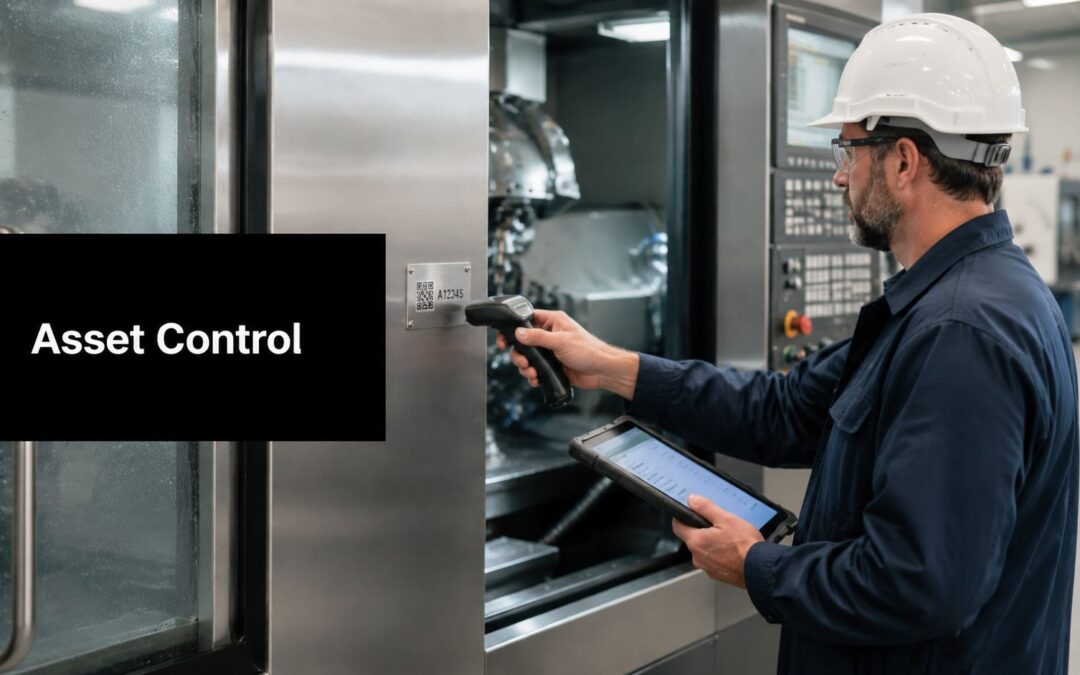
This is the foundation. The platform needs to hold a unique record for each asset and make it easy to retrieve that record in the field. That usually means support for barcode, QR, RFID, or other identification methods that teams can use during inspections, maintenance, stock movements, and audits.
Without this, the system becomes a nice office database that breaks down on the floor.
Maintenance management
For most sites, the maintenance module is where value becomes visible. This is the CMMS side of the platform. It handles preventive schedules, job creation, recurring tasks, fault reporting, work order assignment, labour notes, parts use, and close-out records.
A good maintenance module answers practical questions fast:
- What work is overdue
- Which assets keep failing
- Which technician completed the job
- What parts were used
- Whether the issue was fixed or deferred
Performance monitoring
Some operations need more than maintenance records. They also need live or near-live visibility into condition, utilisation, and performance. That's where monitoring features matter. Depending on the environment, this can include machine status, run hours, alarms, meter readings, inspection trends, or condition-based triggers.
The purpose isn't to collect endless data. It's to make maintenance timing smarter. If your team is weighing service models, it helps to compare predictive and preventive maintenance options before locking software workflows into place.
Inventory and spares control
Maintenance quality drops quickly when spare parts control is poor. Strong systems connect assets to parts, tools, and consumables so teams know what's on hand and what needs replenishment before a shutdown window.
This matters more than many buyers expect because maintenance planning is often undone by basic store issues. The software should support:
- Part-to-asset relationships so critical spares are linked to the equipment they support
- Usage history that shows what gets consumed repeatedly
- Stock visibility across stores, vans, or sites
- Reorder workflows that stop urgent purchasing from becoming routine
Compliance and reporting
Every industrial site has records it must be able to produce. Inspection evidence, service logs, calibration history, shutdown records, and sign-off trails all need to be stored in a way that can be retrieved without drama.
A clean audit trail usually starts with boring habits done well. Correct asset ID, consistent work order close-out, and attached evidence matter more than fancy reporting screens.
Integration matters more than feature count
The strongest platform on paper can still fail if it can't fit the site's workflow. In practice, buyers should ask whether the system can connect with existing maintenance processes, purchasing, contractor management, and mobile field use. More modules don't always mean better outcomes. Better fit usually wins.
Primary Benefits Across Industrial Sectors
The benefits of industrial asset management software change depending on the environment, but the common thread is control. Teams get a clearer view of what they own, what condition it's in, and what action belongs next.
That matters across Australia because physical asset management isn't limited to large corporates. In 2021–22, Australia had 2,340,700 small businesses, according to the Australian business count reference cited here. Across manufacturing, construction, health services, and field operations, that means a very large number of organisations depend on equipment records, maintenance history, and reliable identification.
Manufacturing and processing
In manufacturing, the software helps teams move away from memory-based maintenance. Recurring faults become visible. Service intervals are easier to enforce. Production leaders can see which equipment is creating repeat disruption instead of treating each breakdown as a standalone event.
The gain isn't just uptime. It's better decision-making. A maintenance manager can defend a replacement request when the system shows repeated failures, repeated parts use, and a growing maintenance burden.
Healthcare and clinical environments
Healthcare has a different pressure profile. Device availability, traceability, and service documentation all matter because equipment reliability affects patient care and compliance at the same time.
A hospital or clinic typically needs fast access to service status, test records, and location data for mobile equipment. Systems designed for this space help biomedical and facilities teams keep records organised and retrieval simple. For a more specific look at that environment, this overview of healthcare asset management software is a practical starting point.
Utilities, contractors, and essential services
Distributed assets create their own challenge. A workshop team might be supporting switchboards, pumps, cabinets, instruments, and remote equipment spread across multiple locations. In those settings, software is valuable because it standardises records across sites and reduces dependence on local knowledge.
Benefits usually show up in three places:
- Safer field work because technicians can verify the right asset and retrieve the right documentation
- More consistent maintenance because jobs don't rely on who happens to remember the asset
- Stronger accountability because service records stay tied to the equipment over time
When assets are dispersed, tribal knowledge stops scaling. The software becomes the memory of the operation.
The software doesn't remove operational complexity. It gives teams a controlled way to work through it.
Your Selection and Implementation Checklist
Most industrial asset management software projects go wrong in predictable ways. The buyer chooses a platform based on features, underestimates data cleanup, and treats physical asset identification like a minor follow-up task. Then the rollout stalls because technicians can't reliably match assets in the system to assets in the field.
That's the gap to close.

Part one choosing the software properly
Start with the operating problem, not the vendor demo. If the site struggles with maintenance scheduling, field visibility, contractor records, or compliance retrieval, write those needs down in plain language before speaking to anyone.
A useful shortlist process usually includes:
Define the assets that matter most
Critical production equipment, regulated devices, mobile tools, utilities infrastructure, and inspection-heavy assets often belong in the first phase.Map current workflows
Look at how faults are reported, how work is approved, how close-out happens, and where records are currently lost.Check mobile usability
If technicians can't use the system easily on the floor, adoption will be weak no matter how strong the back-end is.Review integration needs early
Purchasing, stock, finance, existing CMMS processes, and contractor workflows all affect the rollout.Pilot with one area before broad deployment
One line, one workshop, or one asset class gives you a cleaner proof point than a full-site launch.
Part two fixing the physical identification problem
Many implementations fail. A common blind spot is that software only solves the database problem, not the physical identification problem. Vendors may claim benefits such as a 20.1% reduction in downtime, but those gains depend on durable field identification, as noted in this industrial manufacturing asset management discussion.
If the tag is unreadable, missing, damaged by chemicals, buried under grime, or detached from the asset, the software record is stranded. The technician can't scan it, verify it, or trust it.
That's why durable tagging isn't optional. In harsh industrial settings, labels need to survive abrasion, washdown, heat, UV, solvents, and handling. Paper labels won't hold up. General office stickers won't hold up. Even some standard printed labels fail far sooner than the asset they identify.
What works on the floor
For long-life equipment, the dependable options are usually laser-etched stainless steel and anodised aluminium tags. These are suitable when the asset needs a permanent identifier that remains readable through years of service, shutdowns, cleaning, and environmental exposure.
Trotec Laser equipment is commonly suited to this type of precision industrial marking because it can produce clear, consistent engraved information for serialised asset tags, barcodes, QR codes, and equipment identifiers used in demanding environments.
If the site expects the software to run for years, the tag should be built for the same timeframe.
Creating these indestructible labels requires specialised expertise. Evright Industrial draws on the capabilities of evright.com and uses precision laser processes to produce asset tags designed for long service life, so the asset management system can keep linking the database record to the physical equipment.
A practical implementation checklist should include the tagging method, tag material, mounting method, cleaning exposure, readability distance, and scan method before the software goes live.
Understanding Costs Deployment and ROI
Software buyers often focus on licence price because it's the easiest number to compare. In industrial asset management software, that's rarely the full story. The bigger spend often shows up in implementation work, data preparation, integration, training, and the effort needed to make teams use the system properly.

Where the money really goes
Verdantix projects global software spend in this category to reach $17 billion by 2030, and the broader market view shows the services segment held 44.7% of market share in 2023, which points to the weight of configuration and integration in total cost, as noted in this Verdantix spending overview.
That matches what operations teams often experience in practice. Buying the platform is one decision. Making it fit the site is another.
Typical cost areas include:
- Platform licensing for users, modules, and access levels
- Implementation services for setup, workflows, permissions, and forms
- Data migration from spreadsheets, folders, or old systems
- Integration work with purchasing, maintenance, and reporting processes
- Training and change support so supervisors and technicians adopt it
- Ongoing administration to keep records clean and workflows current
Cloud versus on-premise
Deployment choice comes down to risk tolerance, IT capability, and operational preference rather than ideology.
| Model | Usually suits | Trade-off |
|---|---|---|
| Cloud or SaaS | Teams wanting easier updates and less internal infrastructure overhead | Less direct control over the hosting environment |
| On-premise | Organisations with stricter internal hosting preferences or established infrastructure standards | More internal responsibility for upkeep and support |
Neither model fixes bad asset data. Neither model compensates for poor tagging. Those issues sit outside the hosting decision.
How to think about ROI without guessing
The cleanest business case usually combines labour savings, reduced search time, better scheduling, cleaner audits, and improved replacement timing. I wouldn't build that case on inflated vendor promises. I'd build it on local pain points the site already feels every week.
For buyers comparing entry paths, it can help to review a practical pricing example such as DataLunix's Freshservice pricing analysis, not because every platform will price the same way, but because it shows how feature scope and service layers can affect actual spend.
ROI improves when the rollout is narrow enough to work, the data is clean enough to trust, and the field team can identify every tagged asset without hesitation.
If those three conditions aren't met, the software becomes another system people work around.
Your Next Steps for Procurement or a Pilot Project
A strong industrial asset management software rollout usually starts small and disciplined. The best pilot isn't the broadest one. It's the one that proves the operating model works in practice.
Start by putting the right people in the room. Operations, maintenance, stores, IT, and compliance often see different parts of the same asset problem. If only one group defines the rollout, the system usually inherits blind spots from day one.

A practical pilot sequence
Use a contained scope and insist on field validation.
- Pick one asset group such as critical motors, production-line equipment, medical devices, or field service assets
- Audit the current records and remove duplicate, unclear, or obsolete entries
- Standardise the naming convention so the system record and the physical tag follow the same logic
- Choose the tag material and marking method based on actual site conditions, not catalogue assumptions
- Run the workflow live with technicians, supervisors, and anyone who closes jobs or checks compliance evidence
What to verify before wider rollout
Don't judge the pilot by whether the software looked good in a meeting. Judge it by whether daily work got easier and cleaner.
Check these points:
- Can a technician identify and retrieve the right asset record quickly
- Can work orders be completed without side notes and shadow spreadsheets
- Can maintenance history be trusted after the first month of use
- Can the site produce clean evidence when asked for service or inspection records
- Do the physical tags still read clearly after normal operating exposure
The final point is where many projects reveal the truth. If the labels fail early, the whole structure weakens with them. The digital system needs a physical foundation that lasts.
Before you sign a software contract, make sure the asset identification strategy is built for the same operating life you expect from the system itself.
Before you finalise a platform, speak with Evright Industrial about durable, laser-engraved asset labels that can integrate with your asset register, support field scanning, and stay readable in demanding industrial environments.
Recent Comments