

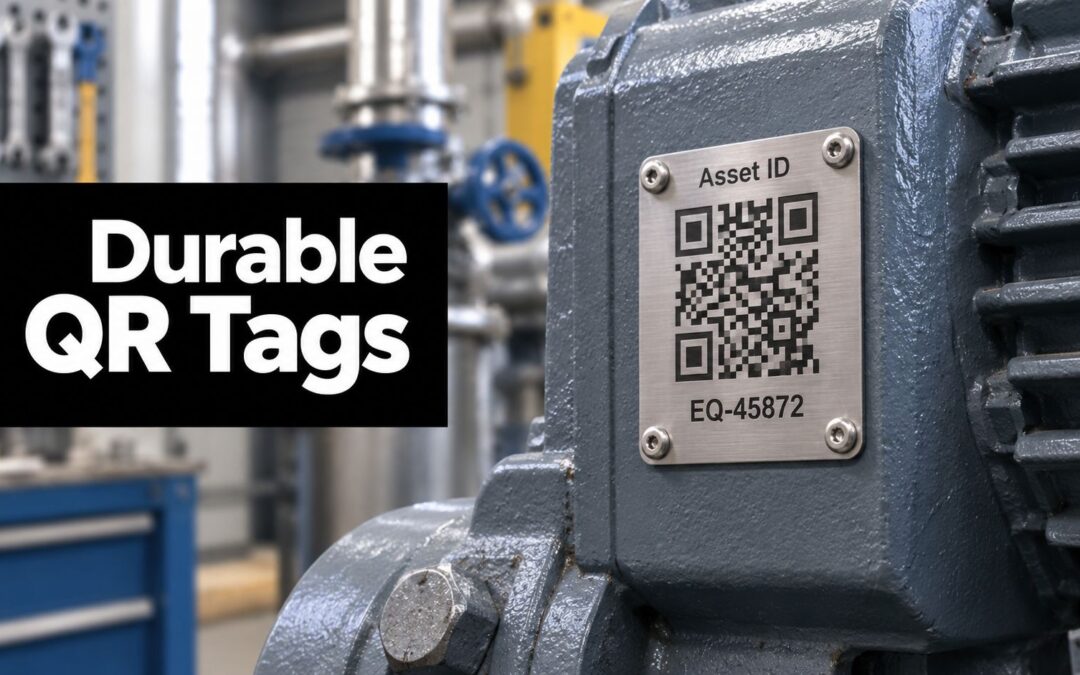
You've probably seen it happen on a busy Australian site. A fitter swears the torque wrench was on rack seven, a portable pump was moved “just for today”, and by the time the shift ends, nobody can say with confidence where either item went. That's the sort of everyday mess QR code asset tags are built to clean up, not as a software trick, but as a physical labelling system that connects the item in your hand to the record in your register.
The important part is the tag itself. If the label peels, fades, or scans poorly, the whole asset process starts slipping. That's why plant managers, hospitals, and public agencies need to think about material choice, adhesion, print method, and lifecycle at the same time, the same way they'd think about bearings, housings, or fasteners on a critical machine.
Why Physical Assets Keep Disappearing on Busy Worksites
A maintenance shed can look organised right up until the first urgent job hits. One technician borrows a calibration tool, another contractor swaps out a pump, and someone else parks a trolley “temporarily” near a loading bay. By lunch, the register says the asset exists, but the floor tells a different story.
That gap is where QR code asset tags do their job. They link each physical item to a live digital register, so the label becomes the bridge between the thing you can touch and the history stored in your system. In Australian operations, that matters because fixed assets have to be tracked across acquisition, movement, maintenance, and disposal, not left to memory or whiteboard notes.
The label itself carries most of the burden. A tag is a manufactured component, and its material, adhesive, and print quality decide whether it survives a clean office, a wash-down area, or a vibrating plant floor. If the tag fails, the register becomes theoretical. If the tag stays attached and readable, the asset keeps its identity even when people move it, clean it, or assign it to a new job.
A switchboard nameplate gives a useful comparison. It only works if the plate stays legible and attached. QR code asset tags do the same job for equipment, except the code also opens the digital record, which means the label has to survive daily handling and still scan reliably months or years later.
A practical reference point is custom name decal stickers. They show how a personalised label bonds to a surface and keeps an item identifiable. Industrial tags use the same basic idea, identity tied to a surface, but the engineering has to handle heat, abrasion, moisture, cleaning chemicals, and repeated handling. That is why the physical tag deserves as much attention as the code printed on it.
If you want a broader framework for choosing and applying tags, CP Con Group's asset-tagging guide is a useful starting point.
Practical rule: if the label can't survive the worst week the asset will see, it's the wrong label.
What a QR Code Asset Tag Actually Is and How It Works

A QR code asset tag is a physical label, usually a metal or heavy-duty polyester tag, that carries a unique scannable code linked to a live asset record. The code can be read with a smartphone camera, which makes deployment much simpler than systems that need dedicated scanners for every workflow. For many Australian fleets, that's why QR tags become the default choice, the tag is inexpensive, the scan is fast, and the value sits in the data behind it.
A traditional barcode stores less information and usually demands cleaner alignment. A QR code, by contrast, uses a two-dimensional matrix, so it can carry more data and still be readable even when part of the pattern is damaged. Independent guides place QR code labels at about $0.01 to $0.10 per tag, or $0.02 to $0.15 per label depending on material and production method, which is why the label itself stays on the low-cost end of the asset-management stack QR code asset tracking guide.
Static code versus live record
The key idea is that the code does not need to hold every detail. A static QR code points to a fixed destination, usually a URL. A dynamic QR code points to a managed record, so the database can change while the printed label stays the same.
That distinction matters in plants, hospitals, and council depots where location, custody, and maintenance history change often. A scan can surface the right asset page, then show location, warranty status, and service history in the CMMS or asset system without reprinting the tag every time a field changes.
What happens after the scan
The scan itself is quick. A technician points a phone at the label, the record opens, and the person can move straight into inspection, work order creation, or a custody check. That simple action is why the label matters so much, it's the entry point to the whole maintenance process.
If you're already thinking in terms of workflow rather than labels, Evright Industrial's asset tracking labels sit in the same conversation, because the physical tag is what turns the register into something a technician can use on the floor.
A tag that scans beautifully in the office but fails on the plant floor isn't a good tag, it's a prototype.
Choosing the Right Material for Harsh Environments
Material choice should start with the worst environment the asset will face, not the average one. That means thinking about heat, chemicals, UV, abrasion, and handling as real design constraints. If a tag lives on a wash-down conveyor, a boiler room panel, or outdoor site equipment, the substrate matters as much as the code.
Comparing the main options
Anodised aluminium is often chosen when you want a tough, clean-looking plate with good durability. Stainless steel goes further in demanding environments, especially where corrosion, cleaning chemicals, or aggressive handling are part of daily life. Polyester labels suit many indoor and sheltered applications because they're flexible, low-cost, and easy to deploy. Polyimide and other laser-engravable plastics are useful where temperature or surface conditions make standard printed labels less reliable.
Durable tags often pair the material with a plain-text asset ID beside the QR code. That fallback detail matters if the code is scratched or partially covered, because the technician still has a manual reference point.
Decision rule: match the material to the worst week the asset will see, not the average day.
| QR Tag Materials Compared | |||
|---|---|---|---|
| Material | Durability | Cost per Tag | Best Environment |
| Anodised aluminium | High for industrial use | Qualitatively higher than polyester | Plant equipment, outdoor assets, clean industrial zones |
| Stainless steel | Very high | Qualitatively higher than aluminium | Harsh cleaning regimes, corrosive areas, critical infrastructure |
| Polyester | Moderate to high in protected settings | Lower | Indoor equipment, office fleets, sheltered plant areas |
| Polyimide and laser-engravable plastics | High where heat and handling are concerns | Varies by build | Electrical panels, controlled industrial environments |
Why laser engraving changes the equation
Laser engraving is attractive because the code isn't sitting on top of the surface in the same way a basic print does. It's formed into the tag itself, which usually improves tamper resistance and long-term readability. That's why industrial teams often prefer a Trotec Laser machine for engraved identification plates, the marking becomes part of the component rather than a layer that can peel away.
For readers comparing deployment options, asset tagging best practices from Reworx Recycling is a useful external reference point for thinking about placement, material choice, and lifecycle discipline. The important point isn't that one material wins everywhere, it's that the tag should be specified like any other industrial part, by environment and failure risk.
Laser Engraving Versus Printed QR Tags

Printed tags and engraved tags solve different problems. Printing wins when you want fast turnaround, colour flexibility, and low unit cost. Laser engraving wins when the asset needs a label that can take abuse, cleaning, and time without giving up its readability.
Where printing makes sense
Dye-sublimation and thermal-printed polyester labels are common because they're easy to produce and simple to replace. For indoor fleets, stores, and light industrial equipment, that can be enough. If the asset is handled gently, kept away from harsh chemicals, and not exposed to hard UV, a printed tag can serve well.
Where engraving earns its place
Laser-engraved metal and anodised plates are stronger choices for washdowns, outdoor exposure, frequent handling, and places where tags get struck by tools or carts. The code is physically cut or marked into the substrate, so it doesn't rely on a surface layer staying intact. That makes it a better fit for assets that live around forklifts, weather, and industrial cleaning.
The trade-off is simple. Printing is cheaper and more flexible at the unit level. Engraving usually costs more to make, but it can reduce replacement work later because the tag survives longer. In practice, many sites use printed tags for lighter-duty assets and engraved metal tags for equipment that would be expensive to retag.
A note on readability
Laser work does have limits. Contrast matters, and some alloys and finishes read better than others. Skilled operators sometimes add a printed overlay or design the recess so the code remains readable after wear. That's where good manufacturing judgement matters, because the best tag is the one your team can scan in the field.
Evright Industrial's engraved metal labels fit naturally into that kind of rollout, especially where identification needs to survive repeated cleaning or rough handling. The Trotec Laser workflow is relevant here because it supports precise, repeatable marking for industrial components rather than decorative labels.
Printing versus engraving at a glance
| Method | Strengths | Trade-offs | Best use |
|---|---|---|---|
| Printed polyester | Low cost, fast production, easy replacement | Less durable under UV, chemicals, and abrasion | Indoor assets, lighter-duty equipment |
| Laser-engraved metal | Durable, tamper-resistant, long-life readability | Higher upfront effort, contrast must be managed | Harsh environments, high-value assets, permanent installations |
Adhesive Selection and Mounting That Actually Lasts
A tag can be perfectly made and still fail if it's mounted badly. That failure is frustrating because it's avoidable. In industrial use, the installation method is part of the product.
Surface prep before anything sticks
Best-practice guidance recommends cleaning the mounting surface with isopropyl alcohol, avoiding curved or heat-exposed surfaces, pressing the tag firmly for 30 seconds, and allowing up to 72 hours for the adhesive to reach full strength tagging guidance. That cure window matters more than many teams realise. If the asset goes straight back into vibration, washdown, or thermal cycling, the bond hasn't had time to stabilise.
Choosing between adhesive and mechanical fixing
For many assets, industrial acrylic adhesives or 3M VHB tape are enough, especially on clean, flat, painted surfaces. Mechanical fixing, such as rivets or cable ties, suits situations where the surface is rough, porous, or constantly handled. On some assets, a hybrid approach works best, for example a stainless plate bonded in place and edge-sealed on a chemical tank.
Curved housings, bare metal, and heat-exposed surfaces usually need more caution. The issue isn't just adhesion, it's the way expansion, texture, and cleaning cycles stress the bond over time. A tag on a smooth painted face is a very different job from a tag on an outdoor enclosure or a porous concrete substrate.
Practical rule: if the substrate is dirty, hot, oily, or curved, assume the first mounting idea is wrong until it's tested.
A field-tested habit
A pilot on 50 to 100 assets is worth more than a thousand assumptions. That lets you verify not only adhesion, but also how the scanning workflow feels in real use. If the tag stays put and the phone reads it easily after a few weeks of normal work, you've got a workable installation standard.
Encoding the Right Data and Integrating With Your CMMS
A QR label should carry only the details it needs to do its job. The printed tag is for identity and scanning, while the live record sits in the CMMS or asset register behind it. That split is what keeps the system practical on the floor and controlled in the back end.
A good way to picture it is a toolbox label on a plant room asset. The label tells you which item you have in front of you, while the detailed history, approvals, and maintenance notes stay in the system. If the physical tag starts carrying too much information, it becomes harder to scan, harder to read, and easier to misplace.
Keep the tag simple
For mixed Australian environments, the safest layout is a human-readable asset ID plus a scannable code. Leave employee names, email addresses, and cost details off the label itself. Those belong in the register behind permission controls, where they can support workflow without being exposed on the plant floor.
The asset record behind a dynamic QR code should hold the stable ID, location, assigned user or custodian, and maintenance schedule. That structure makes it easier for teams to reconcile the register when assets move between areas or change hands. It also reduces rework because the code stays the same while the data can be updated centrally.
Keep the physical tag small in terms of content, not quality. A label that is overloaded with text often looks tidy on a screen, then falls apart once it is printed, handled, and cleaned like any other industrial component.
Build the code for the printer and the scanner
Current guidance recommends a printed label size of at least 2 cm x 2 cm, exported at 300 DPI minimum or as SVG if the design needs to scale cleanly technical asset-tagging guidance. That matters because module clarity affects scan reliability. If the code is too small or soft at print time, the tag becomes awkward to use before it ever reaches the plant floor.
Before a bulk run, test the scan against the CMMS you use. A label that opens the wrong record structure is just as troublesome as a damaged tag. The aim is a clean handoff from scan to work order, not a nice-looking label that sits outside the workflow.
What to integrate with
Most sites want the tag to open a live asset page, then connect into work orders, inspections, and audit trails. That is the point where QR tags stop being labels and start acting like operational shortcuts. If you need a turnkey rollout, Evright Industrial can scope custom tagging solutions and workflow integration around industrial labelling, so the physical tag and the register are designed together rather than patched together later.
Real-World Rollouts in Manufacturing, Utilities and Healthcare
A regional food manufacturer tagged pumps, motors, and conveyors across two plants, and the project team used the tags to bring order to equipment that had been hard to reconcile by sight alone. The main lesson was simple, the tag had to survive cleaning and handling, but the register also had to be disciplined enough to keep location data current when equipment moved between production lines.
A water utility took a different route. It used stainless steel, laser-engraved tags on valves and hydrants at remote sites, where field crews need something they can read in all weather and after long service intervals. The code became a practical link between the asset in the ground and the mobile work order in the crew's pocket.
A metropolitan hospital had another set of priorities. It used polyester QR tags on mobile medical equipment so nurses could find infusion pumps and other shared devices quickly during critical moments. The label had to be readable, discreet, and usable in a setting where custody changes often and cleaning is constant.
What these three examples have in common
- The label matched the environment. Each site picked a tag build that suited its own cleaning, handling, and exposure conditions.
- The asset register stayed central. The code pointed to live data, so teams didn't need to reprint labels every time a record changed.
- The workflow mattered as much as the material. A good tag is only useful if the people on the floor scan it.
The common thread is not the industry. It's the discipline. The best rollout treats the tag as a working industrial component, not a sticker with a QR code on it.
Lifecycle, Compliance and a Monday Morning Action Plan
A QR tag should be planned like any other maintained item. It has a service life, it can be damaged, and it will eventually need replacement. If replacement is built into the asset process from the start, the register stays cleaner and the floor stays less chaotic.
A plant manager would not buy a valve and forget that seals wear out. The same logic applies here. A tag is a physical component with a job to do, and its job continues only while the print or engraving remains readable, the adhesive still holds, and the record behind it stays current.
Compliance and control
For Australian operations, QR tagging supports fixed-asset control by tying the physical item to the digital record across its life. That helps with accounting discipline, equipment identification, and the kind of operational traceability that matters in WHS and audit settings. It also matters for privacy, because a tag visible on a shared asset should not expose more information than a passer-by needs to see.
Tamper-evident overlays can help where externally visible codes may be interfered with. In shared environments, that is a real consideration, especially on equipment that moves between teams or contractors. For broader planning, a practical asset tracking checklist helps set the rules before tags go live.
A practical action plan
Start small. Run a small-scale trial before scaling, so you can check adhesion, scan success, and record accuracy in real site conditions. Expand in phases, using scan success rate and daily tag-audit checks as your main measures implementation guidance.
If you are deciding what gets tagged first, focus on the assets that carry cost, failure history, or custody risk. Then lock in a replacement protocol so missing or damaged labels are reported and reissued quickly instead of sitting in the “we will deal with it later” pile.
Monday morning checklist
- Pick the right substrate. Match material to heat, chemicals, UV, and handling.
- Define the data model. Keep the printed tag minimal, store the rest in the register.
- Test before bulk production. Check scan speed, adhesion, and CMMS linkage on a pilot set.
- Set the replacement rule. A missing tag should trigger action, not debate.
- Train the people who scan. The best tag still needs consistent use on the floor.
The biggest mistake is treating the label as an afterthought. A quality tag is a manufactured product, and the site that designs it properly gets a cleaner register, better audits, and fewer lost assets.
If you want a durable tagging setup that is designed for industrial use, Evright Industrial can help with laser-engraved and printed asset labelling for plants, utilities, and healthcare sites. Visit Evright Industrial to discuss a rollout that matches your equipment, environment, and register workflow.
Recent Comments